The first lesson you learn as a new entrepreneur is to make things lean. But lean could be interpreted in a variety of ways. In this post, I'll introduce you to three no-code tools that can help you create your MVP, and validate your idea while keeping things lean, cheap, and fast.
Description: Create an app from a Google Sheet in five minutes, for free. Glide turns spreadsheets into beautiful, easy-to-use apps.
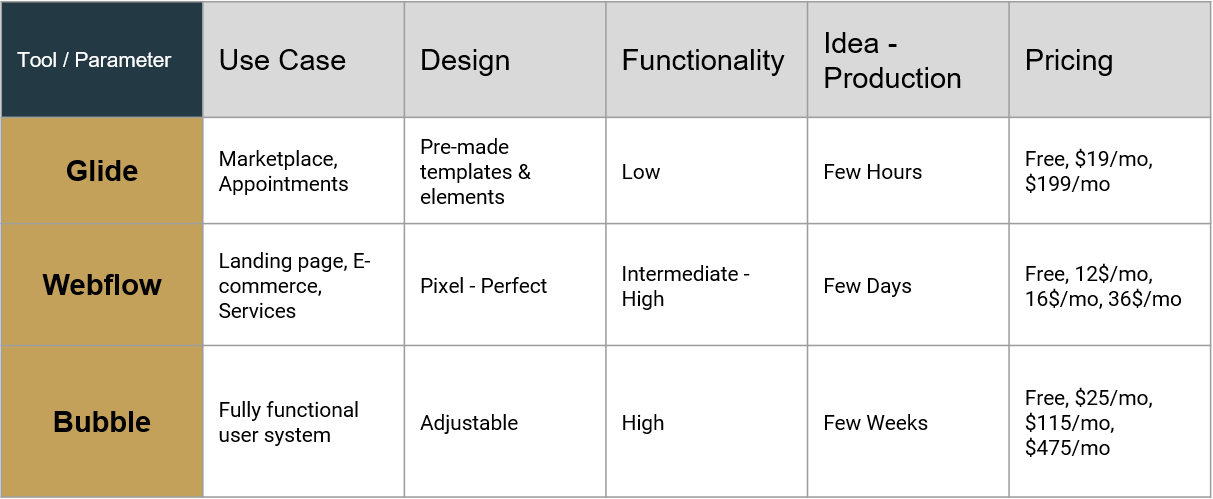
Well, the most basic app will take you only 5 minutes (in case you have your data ready). But also for more complex use cases, with Glide, you can create useful well-designed apps in just a few hours-days.
Glide's easy-to-use drag & drop interface is the ideal solution for quick concept testing. But in addition to its great design, you can create related lists of data, rules, and automation using google sheets and Glide's own formulas. Experienced users can also integrate other automation tools such as Zapier or Integromat, or use google sheet add-ons such as 'API Connector' for advanced automation and web-data integration.

Glide also supports basic user management and enables registration by mail or Gmail. You can also create dynamic pages and features based on the identity of the user.

Description: Build custom blogs, portfolios, e-commerce stores, and more with a flexible CMS. Experience the power of HTML, CSS, and JavaScript in a 100% visual canvas. Free design tool.
Webflow’s Pixel - Perfect website builder tool is not a traditional no-code website builder. It might be the most HTML-CSS no-code replica. It was built to empower designers and entrepreneurs to create truly powerful dynamic sites.

Using Webflow you can’t drop and resize elements where you want to like in Wix for example. It’s all based on HTML-CSS concepts and allows you to create Pixel-Perfect responsive interfaces. Because of the above, the learning curve is a bit steeper, and some HTML-CSS knowledge is needed for better apps. With that said, Webflow has great, focused video tutorials, and lots of free templates for you to use and be inspired by.
In addition to its powerful design capabilities and functionality, you can also create an internal content management system ( CMS) and display dynamic pages and features based on user types or product IDs.

The platform also allows you controlling the SEO markup right in the Editor - rank keywords, create page titles, meta descriptions, and OG settings.
On paid account plans, you can export your project's HTML, CSS, assets, and JavaScript from within the Webflow Designer. You can use the exported code to host it anywhere you would like. No attribution required.


Description: Bubble lets you create interactive, multi-user apps for desktop and mobile web browsers and includes all the tools you need to build a site like Facebook or Airbnb. Build out logic and manage a database with our intuitive, fully customizable platform.
Like no other no-code tools, Bubble can be addressed as a kind of visual coding language. Bubble enables custom user experience: Create logic and determine what happens as users navigate your application, click by click. Building chats, news feeds, and other real-time interactivity. You can also manage data and accounts: Design, search, and export data structures in scalable, secure data store. Set up user accounts and enable log-ins with passwords or any OAuth 2.0 compatible provider, including Facebook, LinkedIn, or Google.

Bubble has an internal DB tool for you to manage. You can control the infrastructure, entities, and relationships, and also integrate your DB into any external API or backend engine. In addition, Bubble supports number of development environments and dev/live DB.

The design is not as pixel-perfect as Webflow, and creating well designed responsive apps can be a bit more complex. Using best practices and their excellent community tips and F&Q you can easily overcome this barrier.
Tech-savvy users can fully extend their apps with Javascript plugins and no-code API connectors or to add their own HTML-CSS elements (mostly not recommended).
Due to its flexibility and high functionality, the learning curve is a bit longer than the other solution, and becoming a Bubble expert may take several weeks - a month of learning and testing.




.svg)