My no-code journey started quite suddenly and without any planning. As an entrepreneur, my team and I have decided to develop our in-house back-end algorithm and hire outsource services for front-end and user management. For a few months, we have been negotiating with a number of outsourcing companies in Eastern Europe , Asia and Israel. The average estimate for our project was around $20,000 for approximately 5 months of development (without bug fixes and adjustments). In the meantime, a friend asked me to join him in a hackathon. We've been trying to build a marketplace for virtual tours for the hackathon, and I've been looking for solutions to quickly and easily create a good-looking marketplace in a day or two. At that time, I fell in love with my first no-code tool- Glide, which will be discussed more deeply later.
After my great experience of using Glide, I've start exploring the no-code world and get to know so many amazing platforms for so many use cases, I can learn quickly and create amazing products without any lines of code. Eventually, I found Bubble.io, (which will also be discussed later) that allowed me to create our MVP almost free, and in a couple of weeks, instead of spending $20 K and 5 months on a product that didn't fit enough to the market.
So what is no code? -
“products and/or cloud services for application development that employ visual, declarative techniques instead of programming.” (The Forrester Wave, 2019)
The no-code trend is on the rise, according to Gartner, by 2024, low code application building (include no-code) would constitute more than 65% of all app development.
No-code enables entrepreneurs and companies be:
Business first - democratizing the development process, enables entrepreneurs / companies to focus on the business side.
Agile - from idea to production in hours/days and not weeks/months.
Also, as product-managers, even if eventually we use developers (in-house or outsource), we’re required to create super detailed requirements docs and user journeys. Using those tools and prototyping your products, really helps in understanding the product structure and helps define it more accurately for the engineers.
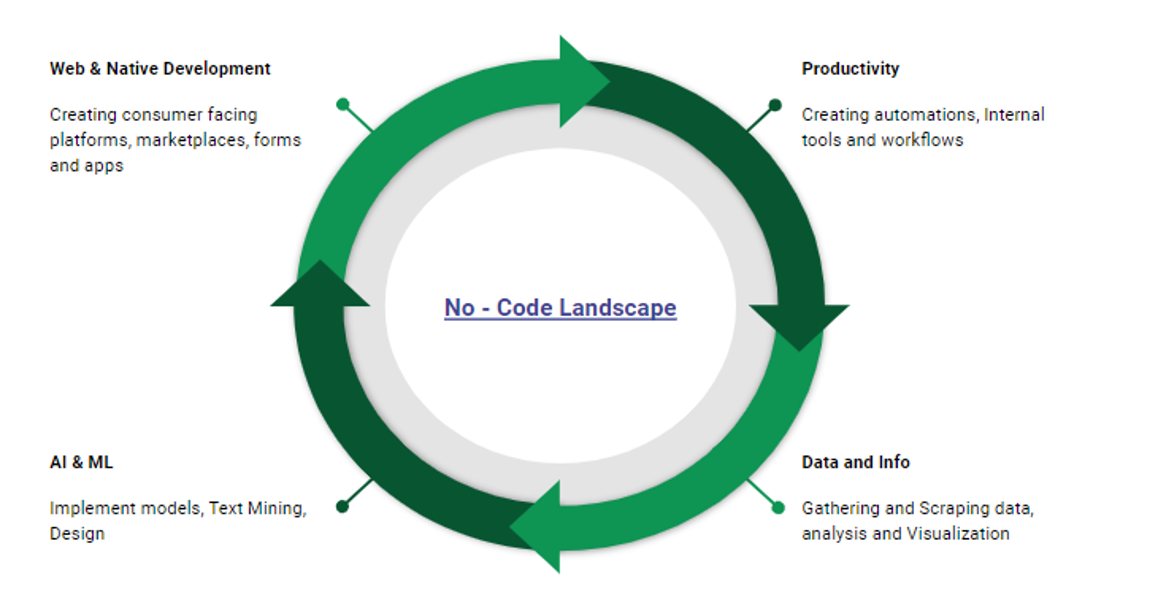
we can divide the no-code landscape to 4 big parts :
it’s hard to decide what exactly fits the definition of no-code data exploring tool (analysis and visualization), but other, more distinct use cases are simple scraping tools (point and scrape) and complex queries without the need for SQL or Python (even if the data in on the server or cloud, in tools like Metabase)
In the last 2 years, this field has grown dramatically and you can find tools to implement complex models, Text Mining, Design, Object Recognition and Predictions.
We can define 3 main use cases relevant specifically for entrepreneurs
Market Validation & leads:
Today, we can create beautiful and prestigious experiences for our first-time potential customers. Tools such as Typeform and Landbot allow you to create stunning and smart chat bots or surveys, that are sometimes all you need for market validation while delivering a high-end experience to your users.
A start-up client, who visualizes and analyzes employees ' social interactions within companies, has once asked me for solutions for a system that collects information from employees and then visualizes the results to managers. They used to work with outsource developers who were not available at that time, and did a mediocre job in the past. Eventually, the best solution was just to create a smart survey with logics in Typeform, embed to their website and automatically send the data to any visualization tool. 1-day process max.
POC / MVP development:
as mentioned earlier, we have so many tools for this use case, so its very important to understand and define exactly what we want to build in order to find the best tool for the task. The most frustrating thing is to start building our project in one tool, and after creating most of it, and being happy with the results, figure out some capabilities or features we want are not possible in this tool.
Google sheets based apps-the fastest and sometimes the best solution for basic mobile interfaces. But, for example, if we want to build a marketplace for which Glide is an excellent solution, but it's important for us that every vendor can share their profile, and after building (in a day!) and listing many vendors on our platform, we realize that Glide doesn't support in-app links, so that sellers can't share their own profiles is a bummer.
We can always choose the safe side, and just choose the most complex tool in each category, bubble.io, for example, which will probably support most of our desires, but in many cases, it will only take time and the result will be mediocre relative to the right tool for the task. It's important to understand from the outset what we want to build and to find the right tool for the task.
As mentioned above, combining these tools with automation and integration tools, such as Zapier or Integromat, may allow you to add many features, even if the tool itself does not support them.
Data operations - Data startups can also use no-code tools for a number of reasons:
Data collection- from the web or other resources. Using tools like SimpleScraper (and many others), you can just point on web elements, and the system automatically recognizes the same elements at other locations on the page (or in other pages). Then you can choose more elements and easily view and download the results as CSV or JSON.
Other tools such as Airtable allow you to manage complex databases, with different data types and relationships, and to integrate them into other no-code front end platforms and automation.
You can later analyze and visualize the data, and even use ML capabilities to find insights easily (e.g.-understanding customer review sentiment using Monkey-Learn)
In conclusion -
No-code is great for many kinds of prototypes, fast and cheap market validation and MVP. It also helps to better understand what you want to build, even if you eventually use developers. It's important to realize what you want to build in advance, and then choose the right platform for the task. In addition, integrating these platforms with automation and integration tools could make your projects super powerful.
Unfortunately, in the case of Complex Engines / Back-end data processing, I have not yet encountered good no-code solutions (I'm on the waiting list of 2 beta products that claim to do exactly that-I'll let you know when I test them). That said, I recommend that you check out- Parabola, which can perform some data processing and 'Back-end' functionality while integrating to any API and also some no-code platforms.
Also, if we want to integrate our app with a lot of external environments, and we're not sure exactly what, even though we might be able to do it with no-code, it's going to be unnatural, and it's better to do it with proper code.
Eventually, if we want to scale, and data and time efficiency are important, we won't want to be bound to the structures of other platforms. But at that point, I can assume that you already have revenue streams and market validation, so we can spend our money and time on developers.
.svg)







.png)